There is a number of steps involved in converting the RAW data into an image. In no particular order, the data must be color-interpolated since most digital sensors employ color masks thereby measuring at each pixel only some of the color and light intensity information. Based on the characteristics of the color mask and the spectral sensitivity of the sensor, some mapping between the measured numbers and actual colors must be used and results must be converted into one of the commonly used color spaces, with the appropriate gamma. White balance is applied in part to emulate our own visual perception, in part to even out the spectral response of individual channels of the sensor. The image is usually sharpened to compensate the effect of the anti-aliasing filter in front of the sensor. This special blurring filter is used to suppress color interpolation artifacts such moire, sampling and interpolation artifacts such as jagged lines etc. A noise reduction of some sort may be applied. Some of these steps may overlap. All in all, converting a RAW file is not a trivial task and involves a decent amount of well documented steps and also some inexact science to make the image look good to us. This is why good RAW processing software is often not given away for free.
Canon RAW format (CRW) is like other RAW formats proprietary and Canon offers a development library that will convert RAW files. Unlike the Nikon's NEFF, CRW in Canon's SLRs has used compression since inception and its first appearance. Nikon now uses a compressed NEFF format too in the D2h, and to make things more interesting, the new Eos 1D II is supposed to feature a new compression. The first Canon RAW format has been successfully decoded by Dave Coffin, a smart programmer from Boston, after months of attempts. Some of his code is used in many commercial software packages that now offer imports of RAW formats. Aside from headers, EXIF information and the optional JPEG, CRW stores the lowest two bits uncompressed since no compression works well for noise dominated data, and a lossless compression is used for the other ten. What noise, you ask - read on.
A series of shots in a half stop increments was taken (starting from the camera metered value 1/60s down to 1/4000s and then up to 2s; the blinds were dimmed for the higher ISO). The shots were taken in quite short intervals and there is a remote possibility this has increased the noise somewhat. The results were evaluated on a 32x32 patch of pixels from the center of the frame (including 512 green pixel, 256 red and 256 blue pixels). To verify even illumination, the quality of results was checked by evaluating rectangular patches of 64x8 and 8x64 with virtually identical results. This experiment is, however, limited by the accuracy of the camera's shutter as well as a well documented noise dependence on the exposure time.
A source code of the program dcraw.c by Dave Coffin was modified to capture red, green, and blue pixel values from a Canon RAW file. The results were evaluated statistically by computing averages, minima, maxima, and standard deviations over the center patch for each of the color channels separately. The only preprocessing step that has been applied to the data is setting the black point by subtracting the reading of a masked part of the sensor from all the data.
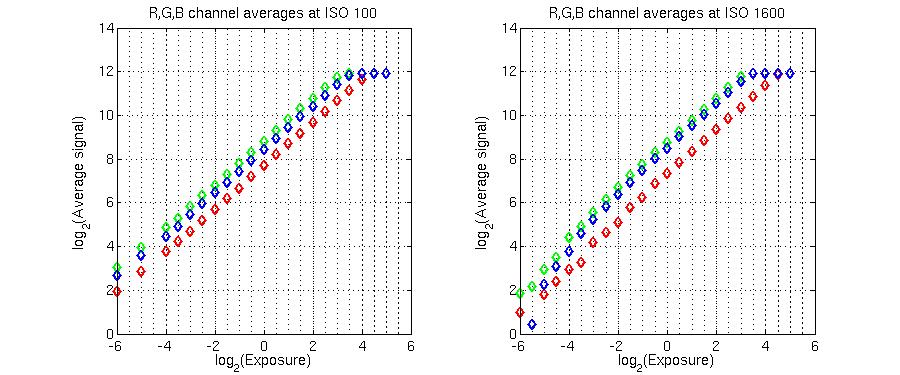
Figure 1 shows the averages over the center patch for each of the color channels as a function of exposure. There is a few properties to note here:
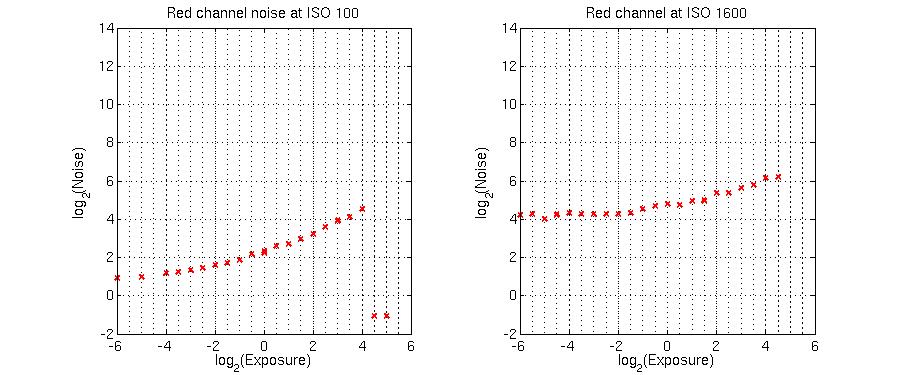
Figure 2 depicts noise measured as the standard deviation from the average value in the red channel (the other channels exhibit similar behavior) as a function of the exposure. The graph has three distinct subregions. On the left, the noise levels out as the noise floor is approached. In the center, the noise becomes shot noise dominated until the sensor saturation is reached, at which point the noise disappears but so does the usable signal response (cf. Figure 1).
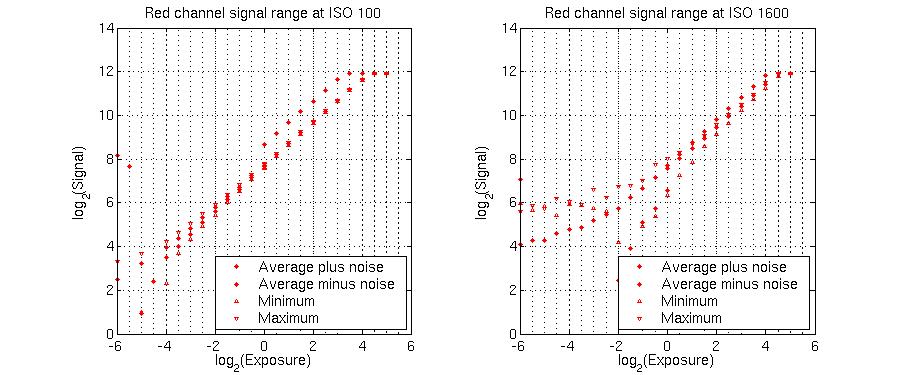
The next figure shows a composite of the previous two - the range of values in the red channel signal, given by taking the average signal and adding and subtracting the noise measured by the standard deviation, and also by the signal maxima and minima.
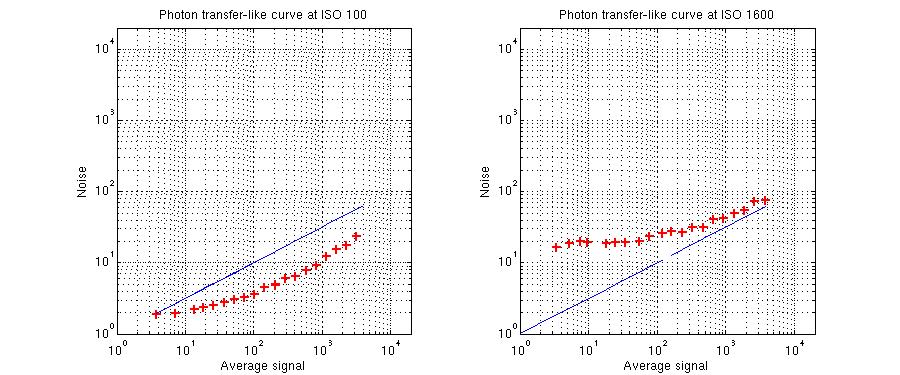
Figure 4 shows a variation of the so-called photon-transfer curve for the red channel - the x-axis shows the signal and the y-axis the noise. The dynamic range is often defined as the ratio of the noise floor, in this case about 2, and the full-well charge (maximum signal before saturation), which turns out to be about 3875, implying the range of 66dB. Also, the middle part of the graphs has a slope of about 1/2 (indicated by the blue line) confirming that the signal there is shot noise dominated as pattern noise non-uniformity would result in a linear increase in noise. Kudos to Canon for the on-pixel noise reduction. In fact, it would appear they have reduced the noise below the theoretical minimum. It is not so. The noise is measured by the standard deviation, which may not be entirely representative for the type of noise encountered, and most importantly, the noise and signal values in the graph are not on the same scale as the photon shot noise mentioned above, which may shift the graph left or right.
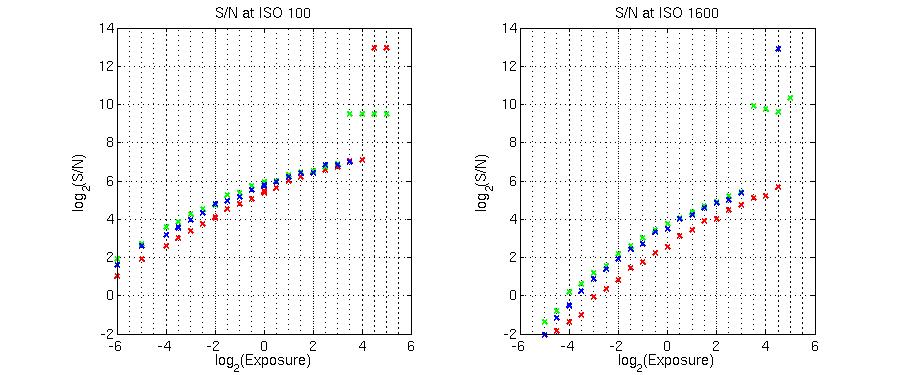
Finally, the S/N (signal to noise) ratio as a function of the exposure is displayed in Figure 5. If the useful range is defined by the range where the signal is not completely lost in the noise (and thus preserves small detail), the S/N ratio must be greater than one. The upper bound of the useful range is obviously the saturation point. Then, the useful range in the red channel is 9EV at ISO 100 and 7EV at ISO 1600. If all the channels are considered at the same time, these numbers are diminished, for the particular color of the light used, to 8EV and 5.5EV respectively.
EOS 10d captures enough of a range of brightness in the photographed scene so one seldom needs to worry about it. Extremely contrasty situations which would be problematic with film will remain problematic. This, at least in some static situations, can be circumvented by shooting the same scene twice with different exposure settings. By their digital nature, the resulting images are straightforward to merge. The noise levels are very low helping to preserve low contrast and shadow detail. It is also important to realize that even in the noise dominated range of exposures, the average CCD/CMOS signal remains linear (cf. Figure 1 and Figure 5) so with some loss of resolution, some detail in the image can still be recovered. In other words, if the noise is objectionable, it can be smoothed out by noise reduction at the expense of resolution.
Even though software white balance can even out the disparity in spectral responses of individual color channels, it is still not time to toss away color compensating filters, especially if the best dynamic range is to be captured in situations with highly colored light. In this respect, it is highly desirable that a camera provide histogram information for each channel separately. In order to achieve the best S/N ratios, one should overexpose but make sure the sensor saturation (resulting in blown-out areas in the image) is not reached. This is tough to do in practice so bracketing may still be a good idea even on top of inspecting the histogram. The histogram separately for each channel will prove to be useful here also. However, from experience, the histogram alone may not reveal the damage done to the visual effect of the image by blown-out areas. This is reserved for inspecting the image at its final display size and thus the need for bracketing.
Let us finish by making a few comments about advantages of the RAW format as opposed to an in-camera JPG. In a lot of respects, the RAW format is an equivalent of a film negative and the post-processed JPG can be likened to a machine photographic print. If the machine settings are appropriate, the print is going to be reasonably close to what is achievable. On the other hand, if we happen to be printing a high contrast scene on a contrasty paper, fail to appply correct color masking, and even get the density wrong, the result may look horrendous. But we can go back to the negative and at least try and reprint to our liking. This is what the RAW format allows us to do. If the white balance, contrast, sharpness, compression have not been set correctly in camera, we can always modify them in the RAW conversion without magnifying artifacts introduced by the previous conversion. On top of that, the additional bit depth information can give us more latitude when it comes to tonality editing, e.g. to bring out shadows or prevent posterization.
 or,
if you prefer, sign an entry in the
guest book.
or,
if you prefer, sign an entry in the
guest book.